Design Your Book’s Table of Contents with AI: A Worked Example
Abstract
A worked example of designing a book’s table of contents page in Adobe InDesign 2026 with an AI chatbot. It starts from the student’s own layout and three reference images, lists the exact page values, and shows how to make ChatGPT, Claude, Gemini or Grok show the design first, change it, and approve it. Only then does it write the script, which is run as shown in guide 4.1. Every prompt has a copy button.
Keywords: table of contents design, InDesign layout, AI design prompts, InDesign script, book layout, design reference images, ChatGPT, Claude, Gemini, Grok
Which four images do you give the chatbot?
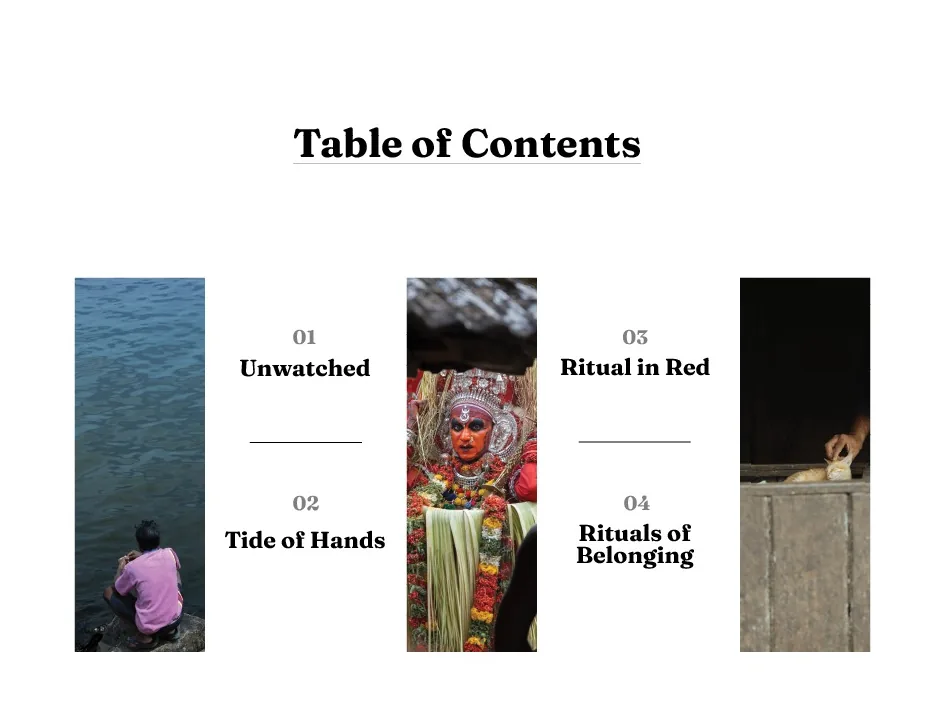
Short answer. Image 1 is your own page layout. Images 2, 3 and 4 are references that show only layout, type and mood.
Rules for the four images
- Save all four as JPG or PNG and name them image1_my_layout, image2_reference, image3_reference and image4_reference.
- Use image 1 for the content and the positions.
- Use images 2 to 4 for style only.
- Upload all four in one message. The pack has a folder for them: 03_My_Images.
Which values do you tell the chatbot?
Short answer. Software and version, page size, margins, grid with gutter, typography, colour and the outcome you want.
Software: Adobe InDesign 2026 (version 22)
Page size: 30.5 x 23.5 cm
Margins: 2.5 cm on all sides
Bleed: 3 mm
Colour space: sRGB
Grid: 5 columns across the live area, no gutter. Column 1, 3 and 5 are photo columns, 4.2 cm wide. Column 2 and 4 are text columns, about 6.4 cm wide.
Photos: three strips, 4.2 x 12 cm, placed in columns 1, 3 and 5
Heading: Table of Contents, centred at the top, Montserrat Bold 40 pt, with a thin grey rule below it
Entries: two in column 2 and two in column 4. Number in Montserrat 14 pt grey, title in Montserrat 18 pt black, a thin black divider between the two entries
Colours: black #141414, grey #8C8C8C
Page number shown: 5
Outcome: a print-ready table of contents page
How do you make the chatbot show the design first?
Short answer. Upload your four images, paste Prompt 1 and ask for a picture and a spec. No code yet.
- Open a new chat in ChatGPT, Claude, Gemini or Grok.
- Upload the four images in one message.
- Paste Prompt 1 with your values filled in.
- The chatbot shows the design, writes the spec and asks three questions.
- Answer the questions.
I am a design student designing a table of contents page (page 5) of a book.
Image 1 is my own layout. Images 2, 3 and 4 are references.
From image 1 take the content and the positions. From images 2, 3 and 4 take only layout, type and mood. Do not copy any text or artwork.

SOFTWARE: Adobe InDesign 2026, version 22, on [Mac or Windows]
PAGE: 30.5 x 23.5 cm, margins 2.5 cm, bleed 3 mm, colour space sRGB
GRID: 5 columns, no gutter. Columns 1, 3 and 5 are photo columns, 4.2 cm wide. Columns 2 and 4 are text columns, about 6.4 cm wide.
TYPE: Montserrat. Heading Bold 40 pt, entry titles 18 pt, numbers 14 pt
COLOUR: black #141414, grey #8C8C8C
OUTCOME: a print-ready table of contents page

Step 1: Show me the design as one picture (an image, or a preview page if you cannot make images). Do not write code.
Step 2: Under the picture, write the design spec as exact values.
Step 3: Ask me 3 questions about anything you are unsure of.
How do you change the design until it matches yours?
Short answer. Compare the picture with image 1, ask for changes with Prompt 1B, and type Approved when it matches.
- Put the chatbot’s picture next to image 1.
- List what differs: size, position, spacing, colour.
- Paste Prompt 1B with one change.
- Repeat until the picture matches.
- Type Approved.
Keep everything the same. Change only this:
Make the numbers lighter grey and move the heading rule closer to the heading.

Show me the new design and update the spec.
How do you get the script and run it?
Short answer. After you type Approved, paste Prompt 2, save the files and run the script as shown in guide 4.1.
- Paste Prompt 2 in the same chat.
- Save the .jsx and the .json from the chatbot in a plain text editor, not Word.
- Put them in a new folder inside Creative Hut, with an images folder holding your three photographs.
- Run the script from the Scripts panel. Steps are in guide 4.1, Run AI Scripts in InDesign.
- If InDesign shows an error, use Prompt 3 from guide 4.1.
Approved. Now write the script that builds exactly this approved design.

Write an Adobe InDesign ExtendScript (.jsx) file for InDesign 2026, version 22, on [Mac or Windows].

Rules:
1. ES3 syntax only. No let, const, arrow functions or template strings.
2. Put a settings block at the top for sizes, colours, fonts and positions.
3. Read all text from a file called page.json in the same folder as the script. Read photograph file names from the same file and place them from an images folder next to the script. If a photograph is missing, draw a grey frame and warn me.
4. Create colour swatches, paragraph styles and character styles in code.
5. Check that each font is installed. If not, use Arial and tell me.
6. Warn me if text overflows.
7. Use try/catch and show a clear alert on any error.
8. Save the .indd, a backup copy with date and time, a print PDF with bleed and crop marks, and a screen PDF into an Output folder next to the script.

Give me:
1. The complete .jsx in one code block, with the file name above it.
2. The complete page.json in another code block, with the file name above it.
3. Five lines on how to run it.
Questions beginners ask
Pictures carry layout, spacing and mood that words miss. Image 1 gives the content and positions, and three references give the look, so the chatbot has less to guess.
No. Take only layout, type and mood from the references. Do not copy their text or artwork, and do not publish them.
You can design the page, but tell the chatbot your software and version because the script code is different. A page with live text and a print PDF is easier in InDesign.
Repeat the grid as numbers and ask it to list where each element sits, in cm, before it writes any code.
Yes. Keep the same method, change the images and the values, and use one chat for each page.
Make this your craft at Creative Hut Academy
Creative Hut Academy in Mattakkara, Kottayam, Kerala teaches photography, cinematography, editing, sound and AI filmmaking in one-year residential diplomas. Students come from across India.
Want to talk? Message us on WhatsApp, or ask Cham, our AI mentor, a study doubt.