Photography Portfolio Book with AI: Claude, ChatGPT and Gemini
Abstract
A guide to turning photographs you have already captured into a portfolio book with an AI workspace: a Claude Project, a ChatGPT Project or a Gemini Notebook. It covers setting up the workspace, permanent instructions and reference files, the Master Portfolio Summary, folders and uploads, choosing a storytelling form, reading photographs with the 5 C’s, and writing captions, cutlines and chapters. Every prompt and template has a copy button. The photographer keeps every creative decision; the AI reads, organises and drafts.
Keywords: photography portfolio book, Claude Projects for photographers, ChatGPT Projects for photography, Gemini Notebooks, AI photo captions, photographic storytelling with AI
Choose your tool. The steps below change with it.
Claude workflow
- New project
- Set project instructions
- Project knowledge
- Chapter chats
Optional advanced path: the Claude desktop app reads your chapter folder, and Skills save your methods (section 07).
ChatGPT workflow
- New project
- Project name
- Project-only memory
- Create project
- Project settings: Instructions
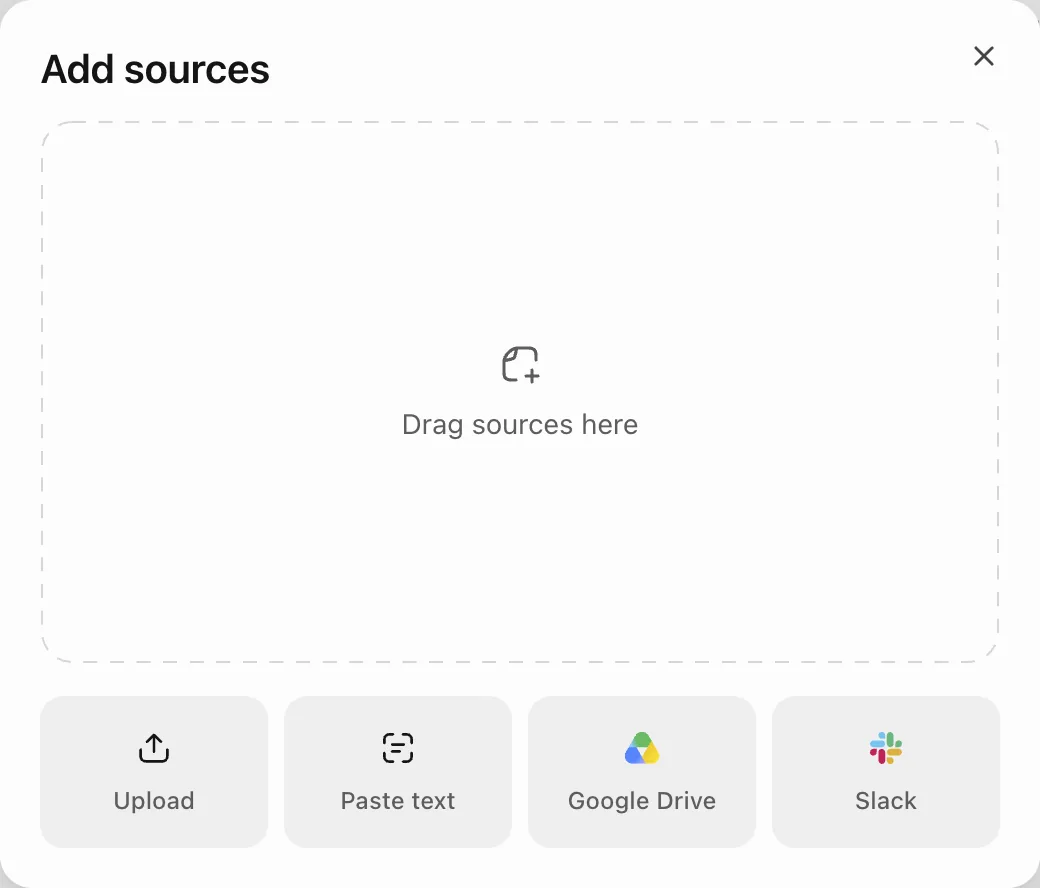
- Sources: Add sources
- Chapter chats
Project-only memory keeps this book separate from your other chats.
Gemini workflow
- Notebooks
- New notebook
- What are you working on?
- Organise your ideas
- Add sources
- Notebook settings: instructions
- Chapter chats
Organise your ideas groups chats by topic and grounds them on your sources.
Why use a Project for a photography portfolio book?
Short answer. A Project keeps one book’s instructions, reference files and chapter chats in one place, so every chat starts from the same rules.
A Project is a workspace in an AI chat tool that holds standing instructions, reference files and related chats. Claude and ChatGPT call it a Project; Gemini calls it a Notebook.
Key facts
- An ordinary chat suits one task, such as correcting a single caption; a Project suits work that runs over many sittings, such as a five chapter book.
- Instructions saved in a Claude Project apply to every chat inside it (Anthropic, n.d.).
- Claude does not read a Project’s name or description, so the rules must go in the instructions (Anthropic, n.d.).
- Chats do not reliably share their full history, so approved decisions belong in one saved file, the Master Portfolio Summary.
Claude
- Make one Project for the whole book.
- Use one chat per chapter inside it.
- Keep approved decisions in Project knowledge.
ChatGPT
- Make one Project for the whole book.
- Use one chat per chapter inside it.
- Keep approved decisions in the Project files.
Gemini
- Make one Notebook for the whole book.
- Use one chat per chapter inside it.
- Keep approved decisions in the Notebook sources.
Make one workspace for the whole book, not one per chapter. The book needs one set of rules; the chapters need separate chats.
- Write the central purpose of your book in one sentence.
- List your chapters as they stand today.
- Choose Claude, ChatGPT or Gemini and note why.
How do you set up the Project, its instructions and reference files?
Short answer. Create the workspace, paste the permanent instructions once, then upload two Library guides as PDF reference files.
Instructions tell the AI how to behave in every chat of the workspace. Reference files hold the material it must follow: the Library guides on storytelling forms, reading a photograph and prompts.
Key facts
- The two reference guides are Seven Major Forms of Photographic Storytelling (the forms) and Reading a Photograph (the 5 C’s, the caption, the cutline and the point note).
- Do not upload Prompts for Photographic Storytelling here. Its prompts make one piece in ordinary chats and would clash with the prompts in this guide.
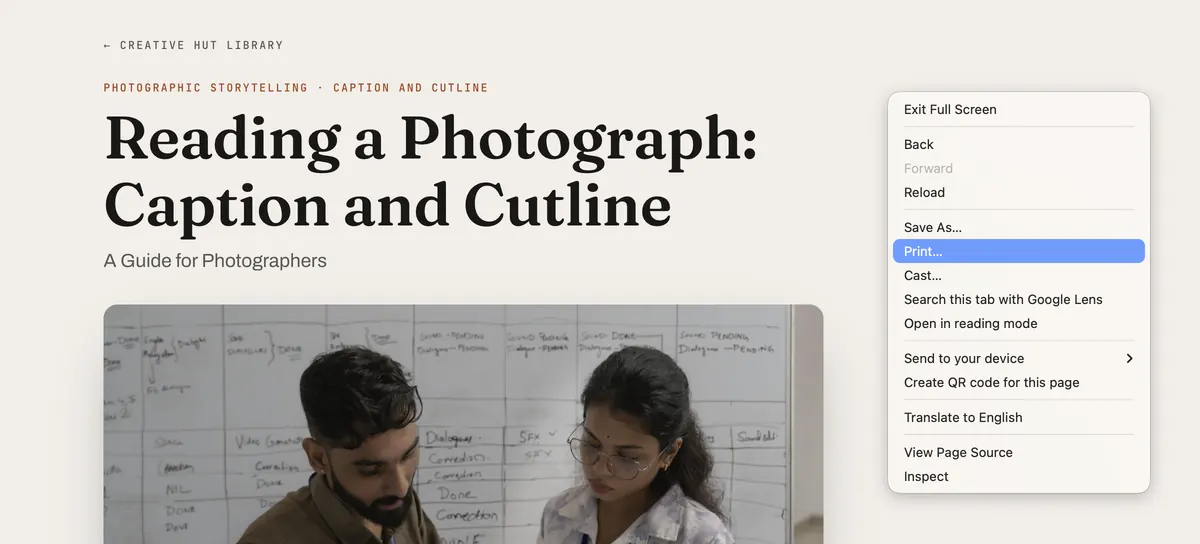
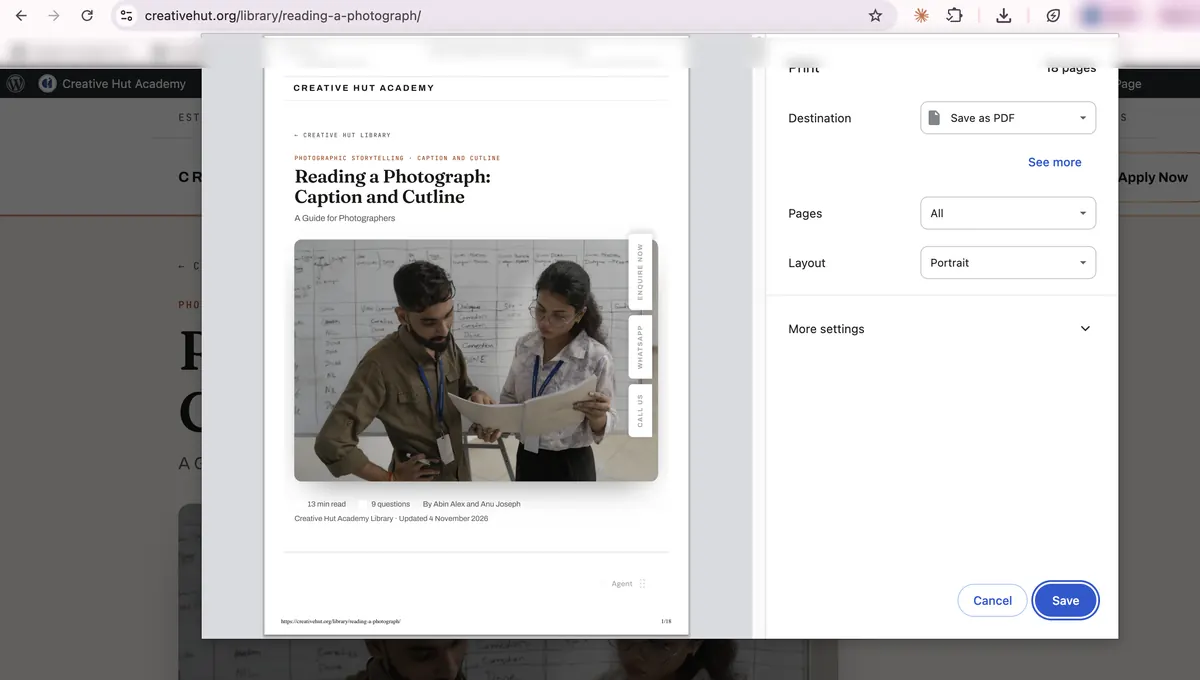
- To save a guide as a PDF, open it in the browser, choose Print and set the destination to Save as PDF.
- A link pasted in a chat is not the same as a file kept in the workspace, so upload each PDF.
- Instructions hold general rules only; the details of one chapter belong in that chapter’s chat.
- In ChatGPT, choose Project-only memory while creating the Project, as it may not be changeable later.
Before you start: save each Library guide as a PDF
 1
 23
Claude: set up your Project
- Open claude.ai, click Projects in the sidebar, then New project.
- In Create a project, paste the two copy boxes below into What are you working on? and What are you trying to achieve?, then click Create project.
- On the project page, click Add beside Instructions, paste Prompt 01 and click Save instructions.
- Click Add beside Context, choose Upload from device and upload the two PDFs.
 1234
 567
 8
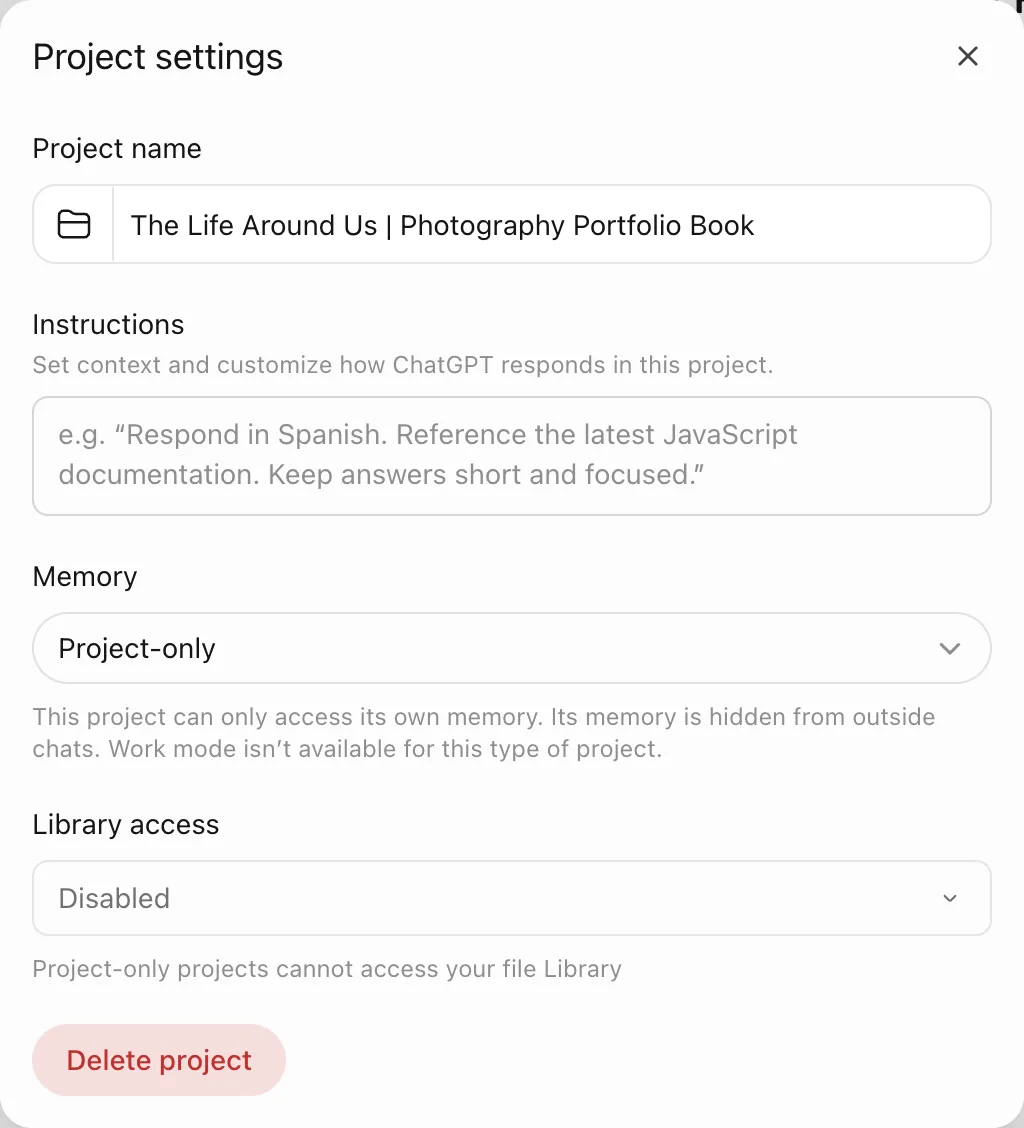
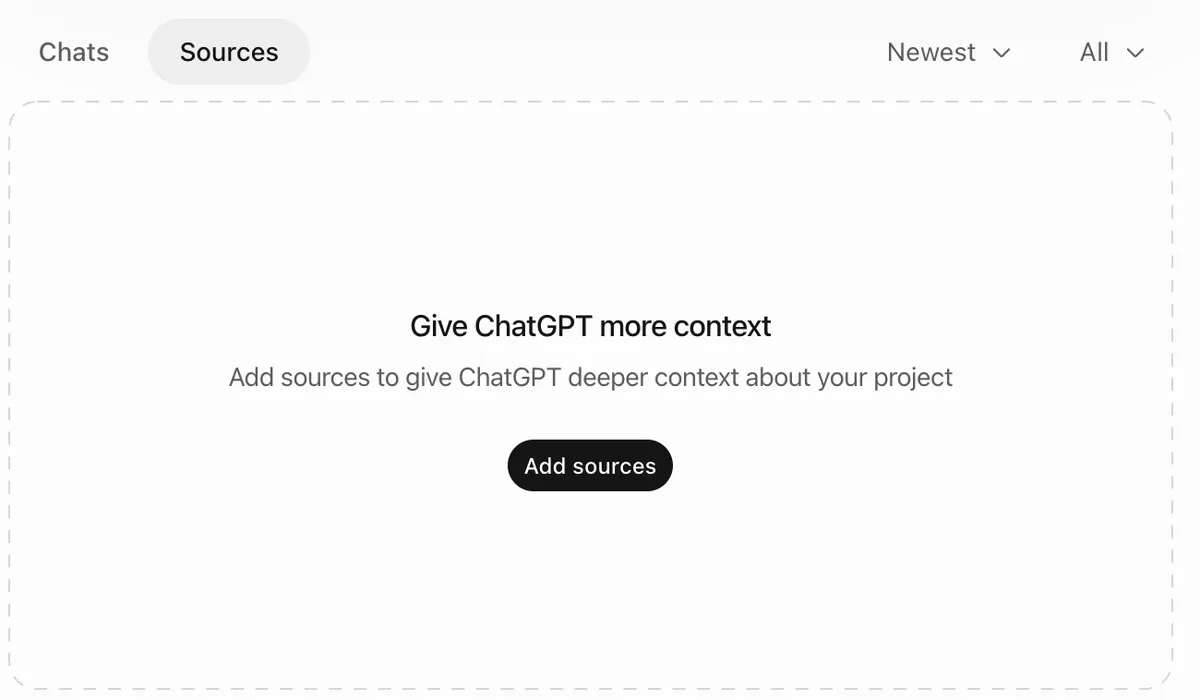
ChatGPT: set up your Project
- In the sidebar, under Projects, click New project.
- Type the book title in Project name, set Project-only memory and click Create project.
- Click ••• beside Share, choose Project settings and paste Prompt 01 into Instructions.
- Open Sources, click Add sources and upload the two PDFs.
 123
 4
 56
 78
 9
Gemini: set up your Notebook
- Open gemini.google.com and click New notebook under Notebooks in the sidebar.
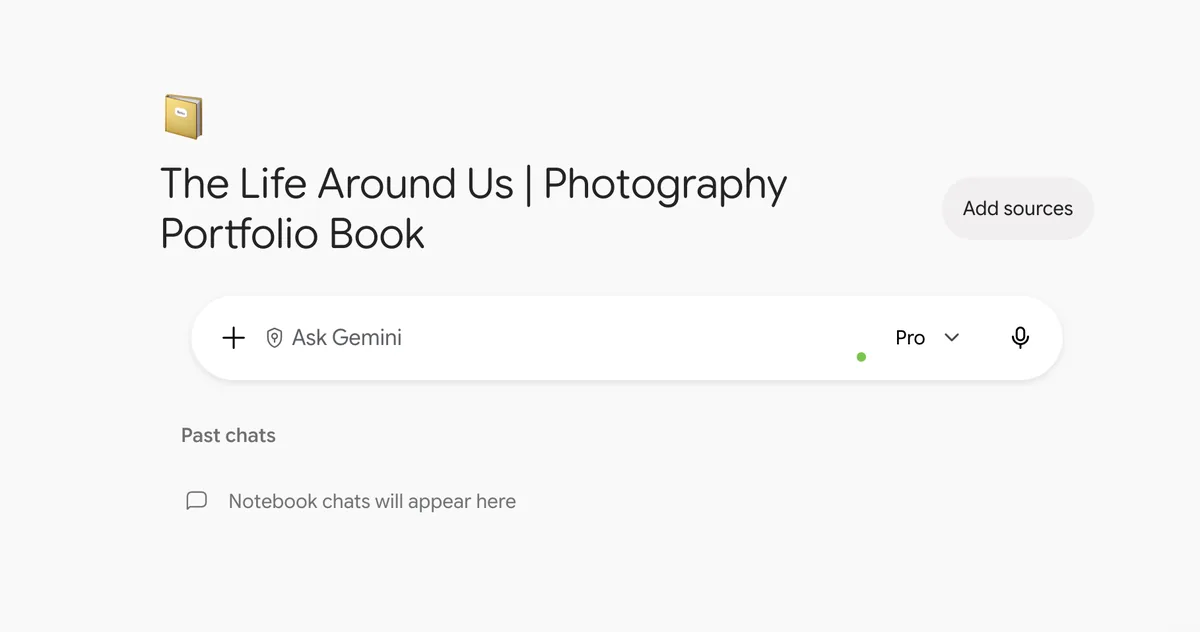
- Type the book title in What are you working on?, keep Organise your ideas selected and click the arrow.
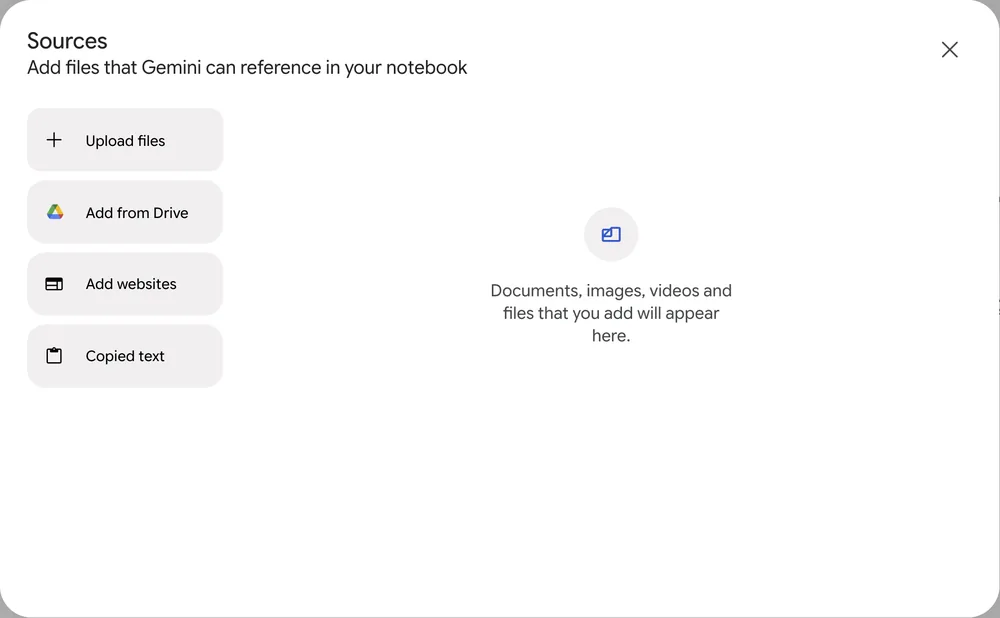
- Click Add sources and upload the two guide PDFs. Add Master_Summary.docx here too once chat 00 has made it.
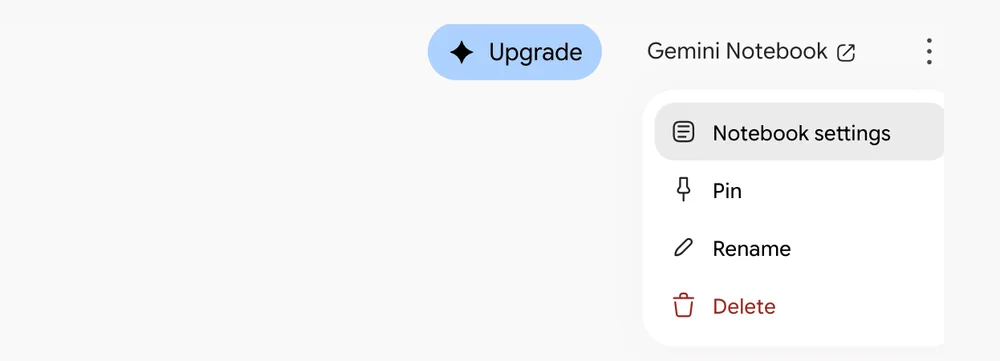
- Click the three dots at the top right, choose Notebook settings, paste Prompt 01 into Instructions and click Save. Leave Use notebook memory switched on.
 1234
 5
 6
 78
 91011
Fill every [bracket]. If you do not know, write "not sure" or leave it empty. The AI will ask or suggest, and never guess.
[BOOK TITLE] | Photography Portfolio BookFill every [bracket]. If you do not know, write "not sure" or leave it empty. The AI will ask or suggest, and never guess.
I am turning photographs I have already captured into a photography portfolio book of [3 TO 8] chapters around one central theme.

I want help to group my photographs into chapters, choose a storytelling form for each chapter, read each photograph with Subject, Space, Setting and the 5 C's, and write captions, cutlines and chapter text from verified facts only.

I follow Abin Alex's framework from the Creative Hut Academy Library: the seven major forms of photographic storytelling and the 5 C's in Photography. I make every creative decision myself.You are my photography portfolio mentor, photographic storytelling assistant and editorial guide. I am developing a photography portfolio book from photographs I have already captured. It will have 3 to 5 chapters at first and may grow to 8. Follow Abin Alex's framework, as set out in the Creative Hut Academy Library guides uploaded to this Project (or Notebook): the seven major forms of photographic storytelling, a teaching framework by Abin Alex, and the 5 C's in Photography by Abin Alex. Your responsibilities: 1. Help me find one central theme connecting my photographs. 2. Help me group my photographs into meaningful chapters. 3. Help me choose a major form of photographic storytelling for each chapter. 4. Explain how the form decides the chapter's voice, writing style, structure, image placement, captions and cutlines. 5. Read photographs with Subject, Space and Setting first, then the 5 C's in Photography by Abin Alex: Components, Composition, Contrast, Clarity and Colour. 6. Help me write captions, cutlines and point notes as the guides describe. 7. Help me put each chapter's photographs in a meaningful sequence. 8. Write chapter text only after the form, the facts and the outline are approved. 9. Keep the whole book consistent. Rules: - My photographs are already captured. Do not make a shooting plan unless I ask. - Do not invent facts, places, events, people, dates, quotations or experiences. - Do not describe anything that is not visible or supplied by me. - Keep visible observations, confirmed facts and interpretations separate. - Use only Abin Alex's seven major forms of photographic storytelling, as in the uploaded guide. Do not invent new forms. - Never claim to have read a photograph or file you cannot open. - Ask for my approval before changing the theme, a form or the chapter structure. - Write in plain, natural Indian English. - Keep my observations, intentions and voice. Explain changes instead of making them silently. - When a chapter's text is finished, give me the updated Master Portfolio Summary and remind me to replace the file in the project files. - Treat everything you write as a draft for me to review. Sequence: review photographs → theme → chapters → form → Subject, Space, Setting and 5 C's → captions, cutlines and point notes → chapter writing → sequence and edit → full book review. Help me learn the process. Do not make the creative decisions for me.
If a rule changes, edit the instructions once. Never repeat the rules in every chat; they drift apart.
- Create the Project or Notebook for your book.
- Paste Prompt 01 and save it.
- Upload the two PDFs, then ask the AI to name each file and its purpose.
What is the Master Portfolio Summary and how do you make it?
Short answer. The book’s memory: one file with the title, theme, chapters and storytelling forms. The AI writes it from your answers in chat 00; you check it, save it as Master_Summary.docx and upload it to the project files.
The Master Portfolio Summary is the book’s single record. Every chapter chat reads it, so the theme and the decisions stay the same across the whole book.
Key facts
- Chats do not reliably remember each other. Gemini’s notebook memory helps, but only this file is a full, checked record of what chat 00 decided.
- You do not fill it in yourself. Prompt 02 asks you simple questions; the AI suggests the title, theme, purpose and audience, and you accept or change them.
- It is fine to start with a working title and an unsure theme. The summary can change as the book grows.
- After each chapter’s text is finished, ask the AI for the updated summary and replace the old file in the project files.
- Without one summary, chapters drift apart and the book loses its central idea.
Chat order inside your project
Chats, named in this order
- 00Master PlanningPrompt 02Attach one contact sheet per chapter. The AI makes the Master Portfolio Summary; save it and add it to the project files.
- 01Chapter One03 Upload04 Form05 Read06 Captions07 DraftOne chapter, start to finish, in this order. Then update the Master Summary file.
- 02Chapter Two0304050607The same order for every chapter.
- 03 to 08More chaptersUp to eight chapters, each in its own chat.
- 09Final Book ReviewPrompt 08Reviews the whole book, chapter by chapter.
Chat numbers and prompt numbers are different. Prompt 01 never goes in a chat; it lives in the project instructions. In the Claude desktop app, Prompt 09 can replace Prompt 03 in a chapter chat.
Claude, ChatGPT or Gemini
- Open a chat named 00 Master Planning.
- Attach one contact-sheet screenshot for each chapter, paste Prompt 02 and answer one question at a time. If you are not sure, say so; the AI gives you options to choose from.
- Check the summary the AI writes, save it as Master_Summary.docx and upload it to the project files.
Before you open chat 00, have ready
- One contact-sheet screenshot for each chapter. In Lightroom Classic, open the chapter in Grid view (press G), remove the rejected photographs and size the thumbnails so the whole chapter fits on one screen. Take a screenshot (Windows: Windows + Shift + S; Mac: Cmd + Shift + 4) and name it CH01_contact.png, CH02_contact.png and so on.
- A word or two for each chapter, such as the place or the subject. Optional.
- What you want a reader to feel or understand. Optional. If you are not sure, the AI will help you find it.
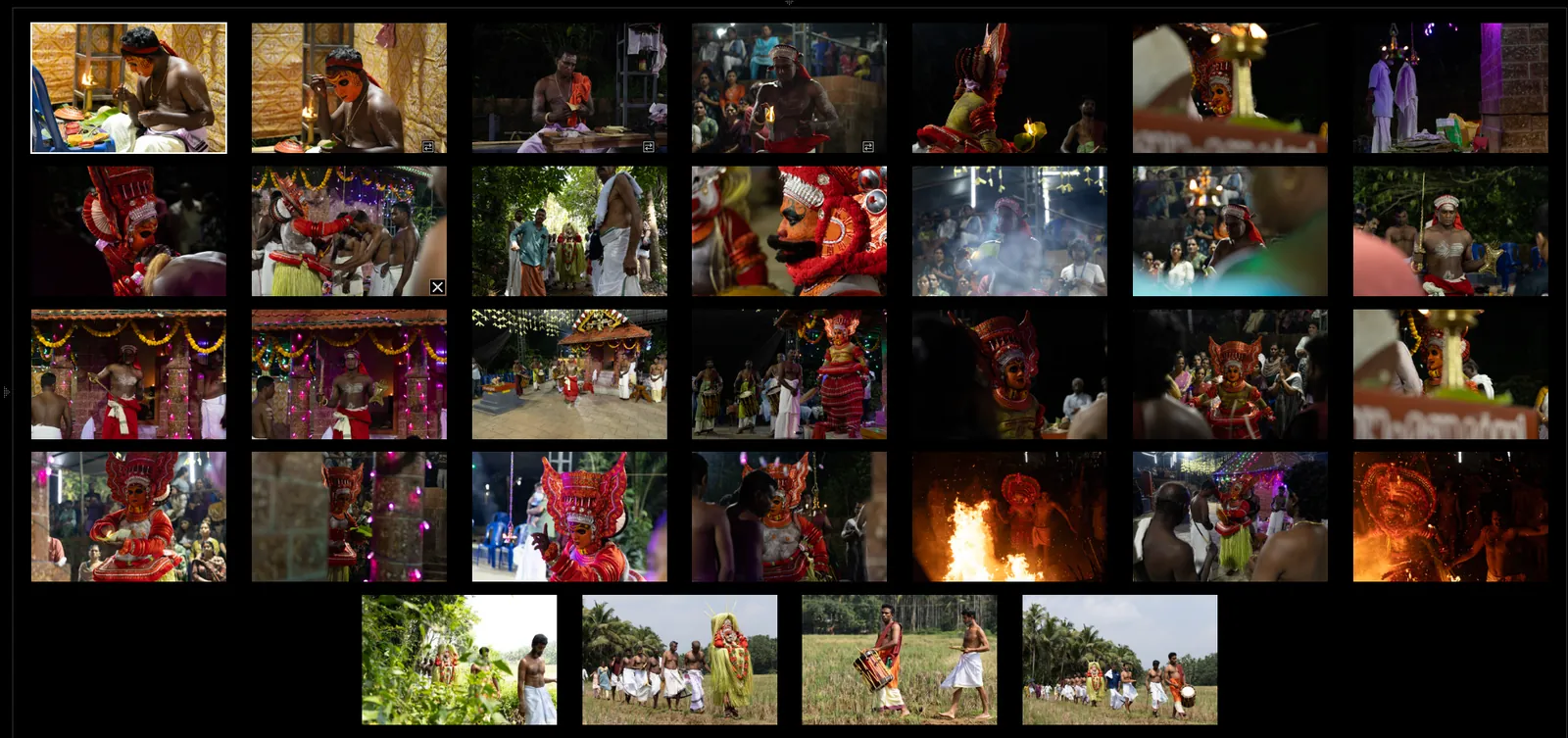
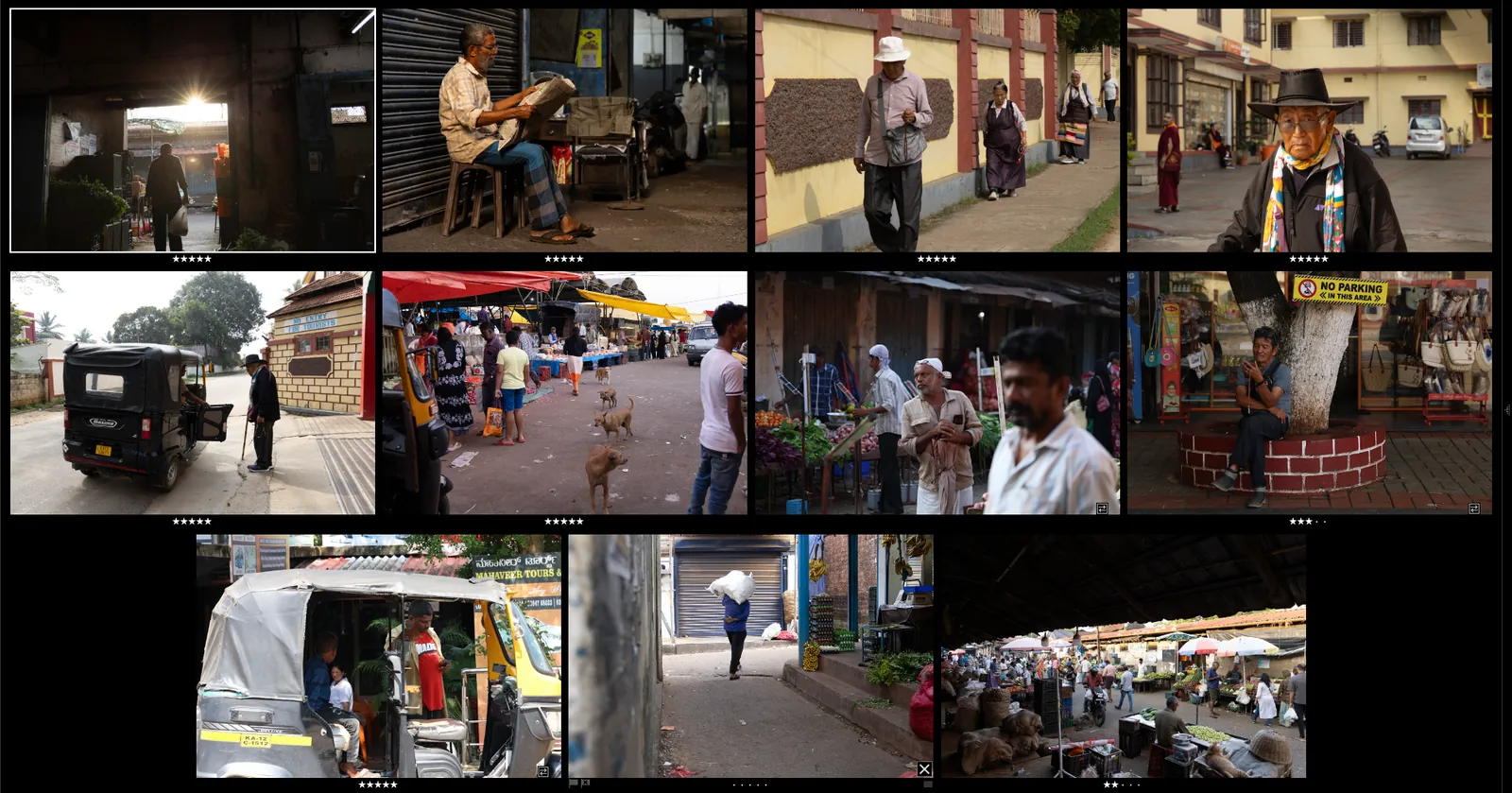
The AI uses the contact sheets to plan the book: the theme, the chapters and a form for each. The thumbnails are too small for reading single photographs; that happens later in each chapter chat, with the 03_Web copies.
Example: one contact sheet for each chapter
Photographs by Rameez Baker, Creative Hut Academy student.


Fill every [bracket]. If you do not know, write "not sure" or leave it empty. The AI will ask or suggest, and never guess.
I have set up my Project (or Notebook) and uploaded the Creative Hut Academy Library guides.
My photographs are already captured. I have attached one contact-sheet screenshot for each chapter: [CH01_contact, CH02_contact, and so on]
Help me make my Master Portfolio Summary.

First, look at each contact sheet and describe it in two or three lines: the main subjects, the place, the light and the colours. These are small previews, so do not read single photographs and do not guess names, places or events.

Then ask me one question at a time to find:
1. My photographic subjects.
2. The common ideas across my photographs.
3. My intended message.
4. A possible central theme for the book.
5. Chapter groupings.
6. Suitable storytelling forms for the chapters.
7. How the chapters relate to each other.

If I am not sure about an answer, suggest two or three options for me to choose from.
Suggest forms only from Abin Alex's seven major forms of photographic storytelling.
Do not invent a theme. Do not assume every chapter uses the same form.
When we have finished, write the summary for my review in this layout. Fill only what we agreed; write "not decided" for the rest.

MASTER PORTFOLIO SUMMARY
Name:
Book title:
Central theme (one sentence):
Purpose of the book:
Intended audience:
Number of chapters:

Chapter 01
Title:
Subject:
Storytelling form:
Chapter essence (one sentence):
Photograph IDs:
(repeat the chapter fields for every chapter)

Book structure (how the chapters connect and why in this order):
Approved decisions (with dates):
Current status (planning, image selection, writing, editing or completed):

Then remind me to save it as Master_Summary.docx and upload it to the project files.Each chapter must add something the others do not. If two chapters say the same thing, merge them.
- Run Prompt 02 in a new chat.
- Correct the draft summary and save it as a document.
- Upload it as a reference file and ask your mentor to review it.
How do you prepare and upload a chapter’s photographs?
Short answer. Keep one folder per chapter, export small named JPG copies for the AI, fill the Chapter Information Sheet, then upload with Prompt 03.
The photographs show what was inside the frame; you supply the facts from outside it. Named files let you and the AI talk about each photograph without confusion.
Key facts
- JPG copies read reliably in every AI chat tool; many tools cannot open RAW camera files at all.
- Copies of about 2000 pixels on the long side are enough; larger files are reduced by the tool anyway.
- Name files by chapter and number, such as CH01_001.jpg, so every photograph has one ID.
- Rename only on export, so the files in 01_Raw stay untouched.
- Before uploading photographs of identifiable people, consider their consent, and leave private details out of your notes.
Lightroom Classic export
- Select the chapter’s photographs and choose File, Export.
- Under File Naming choose Custom Name - Sequence and type CH01_.
- Under Image Sizing set Long Edge to 2000 pixels and export to 03_Web.
Upload
- Open the chapter chat, such as 01 Chapter One.
- Attach a group of photos from 03_Web with the + or paperclip button.
- Paste Prompt 03, fill the brackets and send.
Folder plan on your computer
These folders live on your laptop or hard disk, not inside Claude, ChatGPT or Gemini. The AI never sees them. Each chapter folder holds only its photographs; the writing and layout for the whole book sit together in one Book folder.
- Portfolio_Book
- ReferencesUpload once to project files
- Seven_Major_Forms.pdfSeven Major Forms of Photographic Storytelling
- Reading_a_Photograph.pdfReading a Photograph: the 5 C’s, caption, cutline and point note
- Master_SummaryReplace in project files after each chapterUpdate it when a chapter’s text is finishedMaster_Summary.docx, the Master Portfolio Summary as a Word or Docs file
- Chapter_01Goes with chat 01 Chapter OnePhotographs only
- 01_RawCopy from the memory card to your computerOriginal camera files. Never rename or edit them. Keep a second copy on an external drive before you format the card.
- 02_JPGExport from Lightroom at full sizeFull size copies named CH01_001.jpg, CH01_002.jpg
- 03_WebUpload these to the chatExport again at 2000 pixels2000 pixels on the long side, for the AI chat and for social media
- Chapter_02Same three folders, files named CH02_. Goes with chat 02 Chapter Two.
- Chapter_03Same three folders, files named CH03_, and so on for each chapter.
- BookOne for the whole book
- 01_DocsPaste in what you approve after each chapter chatOne book text file: approved captions, cutlines and chapter text, chapter by chapter
- 02_PSDRetouch from 02_JPGRetouched photographs for print, named like CH01_003.psd
- 03_InDesignLay out photographs and textOne InDesign file for the full book
- 04_PDFExport the PDFProofs while you work, then the final book PDF
- ReferencesUpload once to project files
One photograph's journey
- Camera cardshoot
- Computermake the folders, back up the card
- 01_Rawcopy the card
- 02_JPG + 03_Webexport full size and 2000 px
- Chapter chatupload 03_Web
- Approvetitle, summary, body text, captions and cutlines
- Book / 01_Docspaste the approved text, update Master_Summary
- Reviewchat 09 Final Book Review
- Layout02_PSD retouch, 03_InDesign
- 04_PDFproof, check, final book
Folder numbers are steps inside a folder. They are not chat numbers and not prompt numbers.
Fill every [bracket]. If you do not know, write "not sure" or leave it empty. The AI will ask or suggest, and never guess.
CHAPTER INFORMATION SHEET

Chapter number: [NUMBER]
Chapter title: [WORKING TITLE]
Chapter subject: [WHAT THE CHAPTER IS ABOUT]
Connection to the book theme: [WHY IT BELONGS IN THE BOOK]
Location: [PLACE]
Date or period: [DATE]
People or subjects: [WHO OR WHAT APPEARS]
Verified background facts: [FACTS YOU HAVE CONFIRMED]
My observations: [WHAT YOU SAW, FELT OR LEARNED]
Storytelling form: [FORM OR UNDECIDED]
Photograph IDs in order: [CH01_001, CH01_002]
Fill every [bracket]. If you do not know, write "not sure" or leave it empty. The AI will ask or suggest, and never guess.
I am beginning Chapter [NUMBER] of my photography portfolio book.
Use the book title and central theme from the Master Portfolio Summary in this Project (or Notebook).

Chapter title: [WORKING TITLE, or write "not decided"]
Chapter subject: [WHAT OR WHO THE CHAPTER IS ABOUT]
Connection to the book theme: [ONE LINE, or write "not sure"]
Location: [PLACE]
Date or period: [MONTH OR YEAR, or leave empty]
People or subjects photographed: [NAMES, only with their consent, or leave empty]
Verified factual information: [FACTS YOU CAN PROVE, or leave empty]
My personal observations: [WHAT YOU SAW OR FELT THERE]
Photographs attached: [IDs, for example CH01_001 to CH01_012]

Where I wrote "not decided" or "not sure", suggest options for me to choose from. Where a line is empty, ask me only if you need it. Never guess a name, date or fact.

These photographs are already captured. Follow Abin Alex's framework in the Creative Hut Academy Library guides uploaded to this Project (or Notebook): the seven major forms of photographic storytelling and the 5 C's in Photography.

First:
1. Confirm which photographs you can open.
2. Name the visible subjects and important elements in each photograph.
3. Keep visible observations separate from the facts I supplied.
4. Ask me about important missing information.
5. Suggest the major forms of photographic storytelling that suit these photographs and the chapter's purpose.
6. Explain which form may suit best and why.

Do not write the chapter yet. Wait for me to confirm the storytelling form.
Never edit or rename the files in 01_Raw. The AI only ever sees 03_Web, so the originals stay safe.
- Make the five folders for Chapter 01.
- Export the chapter as named 2000 pixel JPGs to 03_Web.
- Fill the Chapter Information Sheet and upload the first group with Prompt 03.
How do you choose the storytelling form and read each photograph?
Short answer. Compare the seven major forms against your photographs and purpose, decide the form yourself, then read each photograph with Subject, Space and Setting and the 5 C’s.
The form decides the chapter’s question, voice and layout. The 5 C’s in Photography by Abin Alex give a fixed order for reading a photograph before writing about it.
Key facts
- The seven major forms of photographic storytelling are a teaching framework by Abin Alex, developed over 25 years of teaching at Creative Hut Academy.
- Single image asks what is here; photo series or sequence, what do I see; photo story, what happened; photo experience, how did it feel to me.
- Photo article asks what the facts are; photo essay asks why; photo novel asks what if, using panels and dialogue.
- The 5 C’s are Components, Composition, Contrast, Clarity and Colour, read after Subject, Space and Setting.
- A convincing reading is not always a correct one; check each sentence against the photograph.
Choose the form
- Paste Prompt 04 in the chapter chat.
- Read the comparison and the recommendation.
- Decide the form yourself and reply with it.
Read a photograph
- Paste Prompt 05 with the photo ID.
- Delete any line the photograph does not show.
- Add the facts the AI asks for.
Fill every [bracket]. If you do not know, write "not sure" or leave it empty. The AI will ask or suggest, and never guess.
We have reviewed the photographs and background information for Chapter [NUMBER].

Compare the suitable major forms using Abin Alex's seven major forms of photographic storytelling, as in the Creative Hut Academy Library guide.

For each suitable form, explain:
1. The central question it answers.
2. The narrative voice.
3. The writing style.
4. The structure of the chapter.
5. How photographs and text are arranged.
6. How captions and cutlines are handled.
7. Whether my photographs support this form.

Recommend the most suitable form, but do not decide for me. Wait for my confirmation.Fill every [bracket]. If you do not know, write "not sure" or leave it empty. The AI will ask or suggest, and never guess.
Read photograph [IMAGE ID] using the 5 C's in Photography by Abin Alex, as in the Reading a Photograph guide uploaded to this Project (or Notebook).

First name its:
- Subject
- Space
- Setting

Then read it with the 5 C's, one sentence of up to 30 words for each C, in subject, action, object form:
1. Components
2. Composition
3. Contrast
4. Clarity
5. Colour

Describe only what the photograph shows. Do not invent the subject's feelings, intentions, history or circumstances. Keep visual observations separate from interpretations.

Then list the facts you need from me before writing the cutline, and wait for my corrections.Choose the form that suits the photographs and your message, not the writing style you like best.
- Run Prompt 04 for Chapter 01.
- Write two sentences on why you chose the form.
- Read one photograph with Prompt 05 and correct it.
How do you write the captions, cutlines and the chapter?
Short answer. Write the caption, cutline and point note for each photograph from verified facts, approve an outline, then draft the chapter in your own voice.
A caption gives a short idea for the photograph. A cutline gives the verified who, what, where and when. A point note keeps an idea for the chapter writing later.
Key facts
- Not every form uses every element; a photo novel uses panels, speech balloons and narration boxes instead of cutlines.
- Approve the chapter outline before any full draft is written.
- Read the draft beside the photographs; the writing should support the pictures, not replace them.
- When all chapters are done, one review checks the theme, forms, sequence and facts across the book.
Each photograph
- Paste Prompt 06 with the verified facts.
- Correct the caption, cutline and point note.
- Keep the approved text in the chapter chat.
Each chapter
- Paste Prompt 07 with the approved sequence.
- Approve or correct the outline.
- Ask for the draft, then add your own observations.
Whole book
- Open a chat named 09 Final Book Review.
- Paste Prompt 08 with all chapter files.
- Fix each problem it lists, chapter by chapter.
Fill every [bracket]. If you do not know, write "not sure" or leave it empty. The AI will ask or suggest, and never guess.
The readings of photographs [IDs, for example CH01_001 to CH01_008] have been reviewed in this chat.
Use the storytelling form and the facts already approved in this chat.
New or corrected facts: [ANY NEW FACT, or leave empty]

Using Abin Alex's framework in the Creative Hut Academy Library guides, prepare for each photograph the writing this form needs:
1. The cutline, where the form uses one: Subject + Action + Object, then where, then when, in one sentence of 12 to 25 words, third person, present tense.
2. The caption, where the form uses one: one to three words ending with a colon (one or two in a photo essay), interpreting the subject, the action or the object of the cutline.
3. The point note, where the form uses one: a Point, Evidence and a Bridge in 60 to 100 words.

Follow the form's voice and structure. Do not invent facts. Write [ask me] where a fact is missing, and tell me why the writing suits this form.
Fill every [bracket]. If you do not know, write "not sure" or leave it empty. The AI will ask or suggest, and never guess.
I have approved the photograph readings, facts, captions, cutlines and point notes for Chapter [NUMBER].

Chapter title: [TITLE]
Storytelling form: [FORM]
Chapter purpose: [PURPOSE]
Approved photograph sequence: [IMAGE IDS]

Follow the rules for this form in Abin Alex's seven major forms of photographic storytelling. First give me a chapter outline showing:
1. The opening.
2. The main development.
3. How photographs and text relate.
4. The ending.
5. Any missing information or photographic evidence.

Explain how the outline follows the form. Do not draft the chapter until I approve the outline. After approval, write from my verified facts, my observations and my voice.
My photography portfolio book is ready for review. Use the approved Master Portfolio Summary and the chapter files I provide.

Check:
1. Whether every chapter supports the central theme.
2. What each chapter adds to the book.
3. Whether each chapter follows its storytelling form.
4. Whether photographs and writing support each other.
5. Whether the image sequences are meaningful.
6. Whether captions and cutlines are prepared correctly.
7. Whether every factual claim is supported.
8. Whether anything repeats unnecessarily.
9. Whether openings and endings work.
10. Whether my own observations and voice remain clear.

Give a chapter by chapter review with problems and suggested corrections. Do not rewrite the book without my approval.
Never ask for a long story straight from an image. Reading and facts come first, writing comes last.
- Write an approved caption and cutline for one photograph.
- Get an outline for Chapter 01 and approve it.
- Write one sentence on what each chapter adds to the book.
How can Claude work from your chapter folder, and what is a Skill?
Short answer. In the Claude desktop app, Claude can read a chapter folder you allow, so you skip uploads. A Skill saves a method Claude can reuse.
Folder access lets Claude list and read the files in a folder you choose, with your permission. A Skill is a saved set of instructions for a repeated task, such as your caption rules, that Claude loads when the task comes up.
Key facts
- Allow one chapter’s 03_Web folder at a time, not your whole drive.
- The folder prompt forbids moving, renaming, overwriting or deleting files, so the originals stay safe.
- ChatGPT and Gemini users follow sections 04 to 06 with uploads; the method is the same.
- A Skill is worth making once your method is settled, for example the caption and cutline rules you repeat in every chapter.
Claude desktop app
- Open the Claude desktop app and start a chat in your Project.
- Give Claude access to Chapter_01/03_Web when it asks.
- Paste the chapter folder prompt and fill the brackets.
ChatGPT and Gemini
- Keep the same folder plan on your computer.
- Upload from 03_Web only.
- Use Prompts 03 to 08 as in sections 04 to 06.
Fill every [bracket]. If you do not know, write "not sure" or leave it empty. The AI will ask or suggest, and never guess.
I am developing Chapter [NUMBER] of my photography portfolio book.
The photographs are already captured and sorted in the chapter folder.
Read only the folder Chapter_[NUMBER]/03_Web. Work only with files I have attached or allowed you to open.

Chapter title: [TITLE]
Central book theme: [THEME]
Chapter subject: [SUBJECT]
Verified background facts: [FACTS]
My observations: [NOTES]

Follow Abin Alex's framework in the Creative Hut Academy Library guides: the seven major forms of photographic storytelling and the 5 C's in Photography.
First, list the photographs you can open by file name. If a file cannot be opened, list it and do not guess its content.

Then help me:
1. Review their visible content.
2. Find possible groupings and image sequences.
3. Compare the suitable major forms of photographic storytelling.
4. Choose a writing approach after my approval.
5. Read the photographs with Subject, Space and Setting, then the 5 C's.
6. Prepare captions, cutlines and point notes from verified facts.

Do not modify, move, rename, overwrite or delete my original photographs.
Do not draft the full chapter until I approve the storytelling form and structure.
Less access means fewer mistakes. Give the AI only the folder the task needs, and nothing private.
- Give Claude access to Chapter_01/03_Web only.
- Run Prompt 09 and check the file list it reports.
- Write your caption rules in five lines, ready to save as a Skill later.
Questions beginners ask
Any of the three works. Claude and ChatGPT use Projects and Gemini uses Notebooks; each keeps chapter chats, sources and instructions together.
No. It reads, organises and drafts on your instructions. You supply the photographs and facts, choose the storytelling forms and approve every text.
Chats do not reliably share their full history. Keep approved decisions in the Master Portfolio Summary and upload the new version after every change.
Some tools accept a few RAW formats, but JPG copies read reliably everywhere. Export JPG copies of about 2000 pixels on the long side and upload those.
Ask the people for consent first, and leave private details such as phone numbers and addresses out of your notes.
References
- Anthropic (n.d.) How can I create and manage projects? Claude Help Center. Available at: https://support.claude.com/en/articles/9519177-how-can-i-create-and-manage-projects
Read next in the Library
- See Reading a Photograph, Seven Major Forms of Photographic Storytelling, Prompts for Photographic Storytelling, Adobe Lightroom and Adobe InDesign Basics.
How to cite this guide. Alex, A., & Joseph, A. (2026). Photography portfolio book with AI: A guide for photographers. Creative Hut Academy. https://creativehut.org/library/photography-portfolio-book-with-ai/
Make this your craft at Creative Hut Academy
Creative Hut Academy in Mattakkara, Kottayam, Keralam teaches photography, cinematography, editing, sound and AI filmmaking in one-year residential diplomas. Students come from across India.
Want to talk? Message us on WhatsApp, or ask Cham, our AI mentor, a study doubt.